

Got Questions? We Have Answers
- About Tampa Bay Federal
- Account Questions
- ATM Questions
- Certificates of Deposit Questions
- Checking Questions
- Debit Card Questions
- Digital Services Support
- Financial Literacy Questions
- General Product and Service Questions
- Loan and Credit Questions
- Miscellaneous Questions
- Mobile
- Mobile Banking
- Mobile Check Deposit
- Online Banking
- Online Banking Questions
- Online Bill Pay
- Roth IRA Questions
- Security Questions
No. You can only scan single-party domestic checks made payable to the owner(s) of the account. Savings Bonds, foreign checks, third party checks, checks written to you from another account of yours at Tampa Bay Federal, items stamped with "non-negotiable, incomplete checks, stale-dated or post-dated" checks, any checks that contain evidence of alteration to the information, checks purported to be a lottery or prize winning and checks previously submitted for deposit are not acceptable for scanning.
No, DeposZip is accessible to qualified members within Mobile Banking. To make deposits through your mobile device you must have a camera function on your phone and you must install our Mobile App for Apple or Android.
No. The DeposZip program generates an electronic record with each deposit.
Images of paid checks are available within your account transactions. If a paid check does not appear in your transaction history, you may request a copy.
Check copies will be sent via secure email to the email address on file unless you request that the copy be mailed. Mailed copies will be sent to the address on your account within 10 business days. To verify or update your address, go to Online Services and select Address/Phone Number.
Applicable fees will be charged to your account. If the check cleared more than 90 days ago, an additional statement copy fee may apply.
To request a copy of a paid check:
- Select the Online Services tab.
- Select Check Copy.
- Enter the check amount without dollar signs or commas.
- Enter the check number.
- Enter the date the check cleared (MM/DD/YYYY).
- Select Submit.
Tampa Bay Federal supports mobile deposits through our mobile app for Apple and Android. You will have to install our mobile app in order to make deposits through your mobile device. Once installed you can tap on the mobile deposit option to get started.
If you have not yet applied for Mobile deposit, there may be a brief waiting period before you are able to access this service while we process your registration. You will be notified by email when you have been approved.
Your original check remains with you after completing a mobile deposit. If you need an additional copy, please submit a request through Online Banking’s Secure Message Center.
Please note that Tampa Bay Federal charges a fee for each copy of a mobile deposit check. Click here for a list of service fees.
Place the check on a flat well-lit surface that contrasts with the check color (if your check is white, take the picture on a black table).
Take each picture from directly above the check and not at an angle.
Rotate your device to landscape mode when taking the picture.
Take each picture as close as possible, while ensuring that all four corners of the check are visible in the frame.
Make sure each picture is properly focused and not blurry.
Deposit history is available for member review for up to 18 months.
For deposit history older than 18 months, please contact our Digital Branch, send a message through Online Banking, or call Member Services at (813) 247-4414, ext. 7606 to submit a research request.
Up to 999 checks can be included in one deposit and multiple deposits can be submitted as long as the accumulated dollar amount of the deposit(s) does not exceed the daily deposit limit.
$2,000 per check
$2,000 max daily
$10,000 rolling 30 day
The DeposZip session will timeout after 20 minutes of inactivity. There is a Session timeout clock displayed on the top right corner of the screen. During the last five minutes of the session, the clock time will appear in red. Every time the page is changed, the clock refreshes.
Ensure you have properly endorsed the check. If not, delete the back image of the check you have scanned, endorse the item and rescan. If you have the proper endorsement on the check, it is possible your scanner is not detecting the whole check.
You can try using the cropping feature below the scanned image within DeposZip, adjusting the brightness feature of your scanner, select 'custom' image instead of 'color' image if the option is available on your scanner or drawing dots on each corner of the check.
Click on the button (next to the scan button) for more detailed help for adjusting your scanner settings and for more detailed instructions about scanner and driver software.
Proper cropping of check images is essential to ensuring that deposited checks are processed successfully. Most scanners allow images to be cropped by previewing the scanned image then moving the box to properly surround the check.
Try placing the check on the border of the scanning screen to line up the front and back of the check so the scanner reads the size of the check the same way. Click on the scanned image screen below for more detailed instructions on cropping a check
Tampa Bay Federal supports Mobile Deposits through our mobile app for Apple and Android. The minimum requirements are:
Apple
iPhone 3GS or newer.
IPod touch 4G
iPad 2
iPad Mini
Android
Smartphones with Android 2.1 Operating System or greater
None. Members can enjoy the convenience of Mobile Deposit without incurring a fee from the credit union.
DeposZip is designed as an easy-to-use, self-service product. Select "Help" or "?" on each line of the process for a detailed explanation, helpful hints and a short video explanation of that process step.
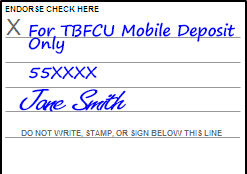
In order for a mobile check to be accepted, you must endorse the check with the following information:
- "For TBFCU Mobile Deposit Ony"
- Account number for deposit
- Member Signature
This information is placed on the back of the check and must be legible in image to process.
DeposZip is a a free secure service available from Tampa Bay Federal that allows you to scan paper checks from your mobile device and electronically send the images to Tampa Bay Federal for deposit through Online Banking.
The basic requirements require that you be at least 18 years of age, have a satisfactory credit history, and have demonstrated satisfactory checking account history as reported by a Consumer Reporting Agency.
Store your check(s) in a safe place for 30 days after you receive confirmation via the deposit history in Online Banking that your deposit has been accepted, and then destroy the check by shredding or another commercially acceptable means of data destruction.
DeposZip can be made to your savings or checking account, or money market account.
Checks submitted for deposit prior to 3:00 pm Eastern Standard Time (EST) will be reviewed on the same business day.
Deposits submitted after 3:00 pm EST will be reviewed the next business day.
Business days are Monday through Friday, excluding Saturdays, Sundays, and holidays.
All deposits will be credited to your account following our standard check hold policies. Please see our hold policy as defined in the Funds Availability Disclosure.