

Got Questions? We Have Answers
For your convenience, you or your insurance agent may furnish evidence of insurance in the following ways:
- Call our Insurance Service Center at 1(800)998-0762 to provide the policy information;
- Visit our verification website www.myinsuranceinfo.com to submit proof of coverage, attach a scanned image, or check your current insurance status;
or
- Mail a copy of your current insurance policy to us at the address below
|
Tampa Bay Federal Credit Union I.S.A.O.A Attn: Allied Solutions P.O. Box 948217 Maitland, FL 32794 |
Understanding the New Auto Loan Interest Deduction Under the One, Big, Beautiful Bill Act (OBBBA)
On July 4, 2025, the OBBBA was signed into law, introducing a tax benefit under Section 70203 — No Tax on Car Loan Interest.
What You Need to Know:
- Tax Deduction: Taxpayers may be able to deduct qualified auto loan interest per year for tax years 2025 through 2028.
- Eligibility Requirements:
- The interest must be paid from a loan on a new passenger vehicle used for personal purposes (used vehicles do not qualify).
- Vehicle was purchased on or after January 1, 2025.
- Borrowers must include their vehicle’s VIN (Vehicle Identification Number) when claiming the deduction.
- Qualifying Vehicles:
- Cars, minivans, vans, SUVs, pickup trucks, and motorcycles.
- Must be assembled in the United States (Vin Lookup).
- Must have a gross vehicle weight rating under 14,000 pounds.
- Interest Paid Information:
- Your total interest paid year to date for your qualifying vehicle is found on your December 31 Credit Union statement or under the specific loan account(s) in online & mobile banking. You will also recieve a seperate letter with this information. Tampa Bay Federal Credit Union advises members to consult their tax advisor or visit the IRS website “No tax on car loan interest (Section 70203)” for full eligibility guidelines.
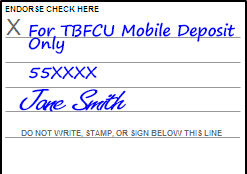
In order for a mobile check to be accepted, you must endorse the check with the following information:
- "For TBFCU Mobile Deposit Ony"
- Account number for deposit
- Member Signature
This information is placed on the back of the check and must be legible in image to process.
Images of paid checks are available within your account transactions. If a paid check does not appear in your transaction history, you may request a copy.
Check copies will be sent via secure email to the email address on file unless you request that the copy be mailed. Mailed copies will be sent to the address on your account within 10 business days. To verify or update your address, go to Online Services and select Address/Phone Number.
Applicable fees will be charged to your account. If the check cleared more than 90 days ago, an additional statement copy fee may apply.
To request a copy of a paid check:
- Select the Online Services tab.
- Select Check Copy.
- Enter the check amount without dollar signs or commas.
- Enter the check number.
- Enter the date the check cleared (MM/DD/YYYY).
- Select Submit.
If a transfer is unsuccessful, you will receive a reference number. Please contact the Digital Branch through the chat feature and provide the reference number. An agent will assist you in determining why the transfer was unsuccessful.
You may place a stop payment on personal checks or transactions online. If you need to place a stop payment on an electronic check, please visit your nearest branch location or contact the credit union. A stop payment fee will be deducted from your account for each stop payment request made. The request will be valid for 6 months after the date of the request.
Please note: Stop payments on checks are not guaranteed until 48 hours after the date of the request.
To request a stop payment on a single check:
- Click on the Online Services tab.
- Click on Stop Payment on a Check.
- Select “Place stop payment on the following account.”
- Select the account you would like to stop a payment on.
- Select the account you would like the stop payment fee to be taken from.
- Click Continue.
- Enter the number of the check.
- Select a reason for the stop payment request from the drop-down menu.
- Click Continue, and you will receive a confirmation that your stop payment has been placed.
Deposit history is available for member review for up to 18 months.
For deposit history older than 18 months, please contact our Digital Branch, send a message through Online Banking, or call Member Services at (813) 247-4414, ext. 7606 to submit a research request.
Your original check remains with you after completing a mobile deposit. If you need an additional copy, please submit a request through Online Banking’s Secure Message Center.
Please note that Tampa Bay Federal charges a fee for each copy of a mobile deposit check. Click here for a list of service fees.
Tampa Bay Federal's routing number is 263183010.
To log into Tampa Bay Federal Online Banking, choose the Online Banking button on the top right corner of any page on the Tampa Bay Federal website.
You can use the Tampa Bay Federal app and access the Card Control feature to report your debit or credit card as lost or stolen.
To report a lost or stolen Tampa Bay Federal Debit Card, call (800) 554-8969.
To report a lost or stolen Tampa Bay Federal Mastercard Credit Card, call (888) 999-1123.
If your employer offers direct deposit, give the payroll department our credit union’s routing number 263 183 010 and your account number.
There are several convenient ways to make a payment on your Tampa Bay Federal loan. You can:
- Visit our Make a Payment Portal.
- Log in to Online Banking.
- Contact our Digital Branch or Member Contact Center.
- Visit any Tampa Bay Federal branch.
- About Tampa Bay Federal
- Account Questions
- ATM Questions
- Certificates of Deposit Questions
- Checking Questions
- Debit Card Questions
- Digital Services Support
- Financial Literacy Questions
- General Product and Service Questions
- Loan and Credit Questions
- Miscellaneous Questions
- Mobile
- Mobile Banking
- Mobile Check Deposit
- Online Banking
- Online Banking Questions
- Online Bill Pay
- Roth IRA Questions
- Security Questions